Thinqloud AdminCommunities

Volunteers are the backbone of many nonprofit organizations. They help with fundraising, events and administrative tasks, offer professional skills (to name a few) and most importantly they help spread awareness for the mission of your organization.
Any non-profit needs to manage its resource pool of volunteers. In addition, there can be different type of volunteers:
Volunteer Management
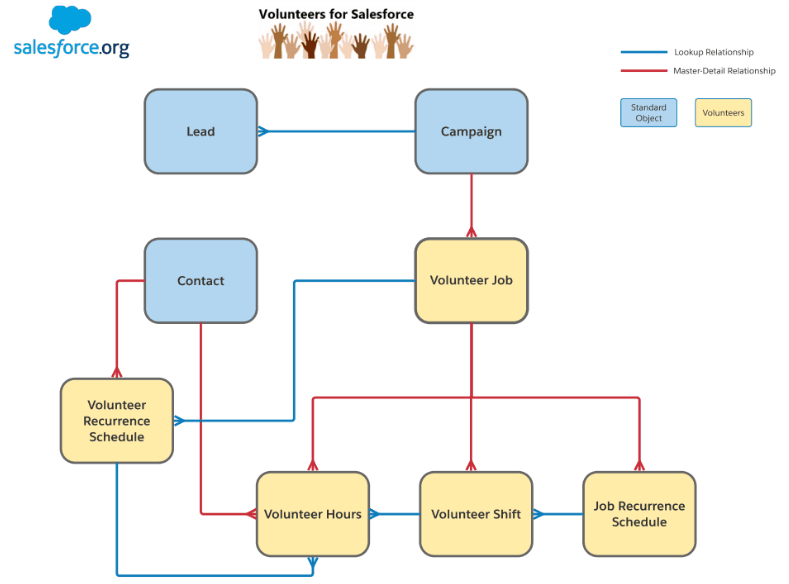
Volunteers for Salesforce uses some standard Salesforce objects—Contacts and Campaigns—to manage volunteers
To capture the Volunteer details below mentioned data we need to capture and these fields will be available on Lead object
Once we captured the volunteer details every system will have its different process for selection of these volunteers currently we have captured these details in Lead object. Here after completion of selection process using Lead Convert Feature and Lead mapping this lead will be converted to Contact and the Data will the reflected on Contact record as well.
Fields
Features-
Fields
Number of volunteers required for a specific event, types of volunteer jobs, shifts and hours needed, volunteers remaining to fill a job or shift and volunteer website time zone for any given event
Validations- Child Campaign can have only one parent campaign.
Features-
Fields-
Features-
Fields-
Features-
Mass Edit Volunteer Hours- requires when need to modifies volunteer’s hours for bunch of volunteers.
Fields-
Volunteers hours calculated hours performed by a Volunteer for a respective job, thus same volunteer hours is reflected on volunteer’s contact record page under volunteer hour’s related list. Finally when volunteer completes the job the job status changes to Completed and automatically on Contact > Related List > Volunteer Hours – Volunteer hours details is reflected.
The Volunteers Dashboard provides a ton of valuable data for the Volunteer Manager.