
Root Cause Analysis Agent
Automated Apex Error Root Cause Analysis for Salesforce
Understand why failures happened — not just that they happened.
As a Salesforce org grows, errors accumulate across Apex classes, triggers, flows, and async jobs faster than developers can manually triage them. Rather than relying on a developer to notice and investigate each error, the Root Cause Analysis Agent runs on a fixed schedule every 15 minutes. It fetches every new error-status ApexLog, parses it into structured diagnostic data, and routes it through three escalating detection layers — stopping at the first layer that produces a sufficiently confident result.
See It In Action
Watch how the Root Cause Analysis Agent fetches new Apex error logs, routes them through three detection layers, and produces a structured root cause record — automatically, without waiting for a user report or a developer to open a log.
Root Cause Analysis Agent — Demo
Why Production Errors Are Hard to Diagnose
Diagnosing a single incident is a repetitive, time-consuming process that produces no reusable record once it is closed:
How the Root Cause Analysis Agent Works
Rather than relying on a developer to notice and investigate each error, the agent runs on a fixed schedule every 15 minutes. It fetches every new error-status ApexLog, parses it into structured diagnostic data, and routes it through three escalating detection layers — stopping at the first layer that produces a sufficiently confident result:
Step 1 — New error logs fetched and parsed
Every 15 minutes, the agent queries ApexLog for error-status records not already represented in an RCA record. Each log body is fetched via the Tooling API, truncated to the last 60,000 characters (where the FATAL_ERROR section always appears), and parsed into exception type, message, affected class/method/line, stack trace, governor metrics, and execution path.
Step 2 — Layer 1 — Deterministic rule engine
Every active RCARule__c record is evaluated against the parsed log in priority order. Each rule carries a regex pattern, pre-written root cause and fix templates, a severity classification, and a confidence score. The first rule that matches wins — no external call is made. Rules are admin-editable without a code deployment.
Step 3 — Layer 2 — Deployment and historical correlation
If Layer 1 confidence is below 85, the correlation engine checks three independent signals: recent async jobs on the affected class, Setup Audit Trail entries mentioning the class or related area, and similar resolved RCA records from the last 90 days. Correlation confidence is capped at 70 — it can never auto-resolve at the same tier as a direct rule match.
Step 4 — Layer 3 — AI analysis (GPT-4o)
If confidence is still below 70 after Layers 1–2, a sanitized payload is sent to OpenAI GPT-4o. Raw log text, source code, record Ids, email addresses, and Bearer tokens are stripped before any callout. The model returns a structured JSON response with root cause, contributing factors, immediate actions, permanent fix, preventive steps, severity, and a confidence score.
Three-layer detection — confidence thresholds and routing
| Detection layer | Confidence | How it works |
|---|---|---|
| Layer 1 — Rule Engine | ≥ 85 | Deterministic regex match against a maintained dictionary of known failure patterns. Fast, zero external cost. First choice for every log. |
| Layer 2 — Correlation | 60–84 | Deployment activity, Setup Audit Trail changes, and similar historical RCA records correlated against the error. Confidence capped at 70 — never auto-resolves at the same tier as a direct rule match. |
| Layer 3 — AI (GPT-4o) | < 70 | Sanitized payload sent to OpenAI GPT-4o only when Layers 1–2 were inconclusive. Raw log text, source code, record Ids, and email addresses are stripped before any callout. |
| Fallback — Human Required | 0 | If all three layers are inconclusive, an RCA record is still created with status Human Required — guaranteeing every error produces a record regardless of outcome. |
Functional Flow Diagram
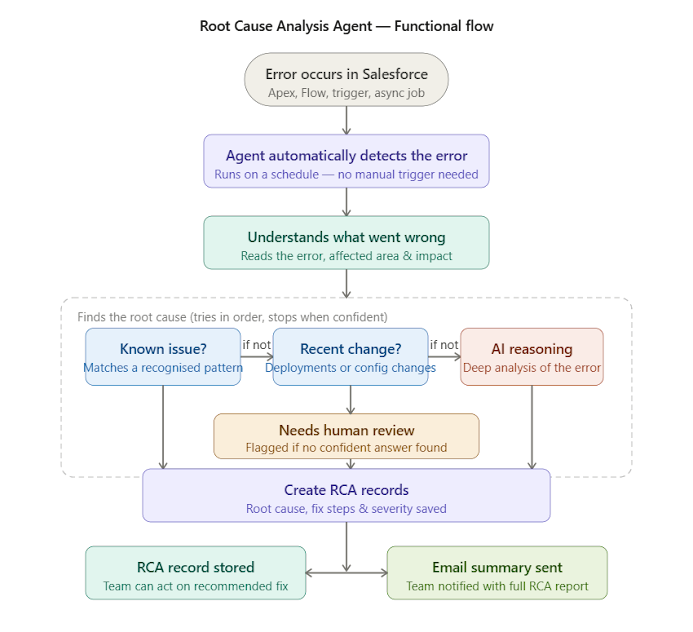
Functional flow: from automatic error detection through the three escalating root-cause checks to the saved RCA record and email summary.
Technical Solution Overview
The Root Cause Analysis Agent is an Agentic solution built on native Salesforce infrastructure. The Scheduled Apex orchestration layer autonomously runs end-to-end — continuously fetching new error logs, parsing them into structured diagnostic data, routing them through three escalating detection layers, and deciding what root cause and action to surface to developers — rather than waiting to be asked.
Each capability is delivered through Salesforce technologies as follows:
Architecture principle: Deterministic Apex guarantees accuracy and auditability for anything involving error classification and confidence scoring; Generative AI (GPT-4o) handles root cause language, contributing factors, and fix recommendations; and the Scheduled Apex orchestration layer makes the system truly agentic.
Key Features
Incremental Processing — Only New Logs Analyzed Each Run
The agent does not reprocess logs already represented in an RCA record. Each run independently queries the last 24 hours of error-status ApexLogs and excludes any with an RCA record created in the last 2 days — making every analysis efficient and every unprocessed log eligible for retry.
Security-First AI Integration — Sanitized Payloads Only
The AI layer is designed so that sensitive data never leaves the org. A dedicated sanitizer strips all identifiers and credentials from the log payload before any callout is made.
AI output fields returned per analyzed error
| AI output field | What it tells you |
|---|---|
| Root cause | Plain-language explanation of why the failure occurred. |
| Contributing factors | Secondary conditions that contributed to the failure. |
| Immediate actions | What to do right now to mitigate the issue. |
| Permanent fix | The underlying code or configuration change needed to prevent recurrence. |
| Preventive steps | Broader practices to avoid similar issues in the future. |
| Execution path | The automation chain (e.g. Flow → Trigger → Queueable) that led to the failure. |
| Affected functionality | The business function or process impacted. |
| Severity | CRITICAL, HIGH, MEDIUM, or LOW. |
| Confidence score | 0–100 integer indicating how certain the model is in its analysis. |
Admin-Configurable Rule Dictionary — No Deployment Required
The Layer 1 rule dictionary is stored as RCARule__c records, editable by an administrator without a code deployment. Rules support merge tokens so pre-written guidance can reference the specific class, method, and line from the parsed log.
Resilient by Design — Every Log Produces a Record
Failure to analyze one log never aborts the batch. Per-log exceptions are caught and logged, the loop continues, and an explicit Human Required fallback guarantees every error log still produces an RCA record — even if all three layers are inconclusive.
Solution Tech Highlights
The agent runs on native Salesforce scheduling and data infrastructure for the first two detection layers, with a single third-party AI call reserved for the cases neither layer can resolve with confidence.
Salesforce Components
Third-Party / External Components
The only external dependency is invoked as a last resort, on a sanitized payload, when the native rules engine cannot reach a confident answer:
Business Impact
The Root Cause Analysis Agent turns error investigation from a manual, per-incident activity into a continuous, system-driven process — with a permanent, queryable record of every analyzed failure.
| For Developers | For Technical Leads & Architects | For Operations & Business Leaders |
|---|---|---|
| Stop reading debug logs manually — every error arrives with a structured root cause, contributing factors, and a recommended fix | Full visibility into production failures within 15 minutes of occurrence — no manual triage backlog | Continuous, automated first response to every production error — no on-call developer needed to triage each incident |
| Admin-editable rule dictionary means known patterns are resolved instantly at Layer 1, without any developer involvement | Severity ratings (CRITICAL/HIGH/MEDIUM/LOW) and confidence scores enable instant prioritization | Post-run summary email keeps the team informed after every scheduled cycle |
| Correlation engine links errors to recent deployments and Audit Trail changes automatically | Historical RCA records enable trend analysis — recurring error patterns become visible across the full org error history | Every analyzed error produces a permanent, reportable record in standard Salesforce list views and reports |